Introduction
AI generated digital painting has moved from novelty to a daily creative practice for millions of artists and hobbyists. The global AI image generator market reached USD 484.29 million in 2026 and is projected to climb toward USD 1.75 billion by 2034, according to Fortune Business Insights. More than 150 million people now use these tools every month, producing roughly 80 million images a day. This guide covers AI generated digital painting from start to finish, from a blank prompt to a print-ready canvas. You will learn how diffusion models work, which tools fit which styles, and how to refine and upscale a piece. We also cover the legal and ethical questions that decide whether you can sell what you make. The aim is a complete, honest workflow rather than a list of disconnected tips.
Quick Answers on AI Generated Digital Painting
What is AI generated digital painting?
AI generated digital painting uses text-to-image diffusion models to turn written prompts into painterly artwork. The artist guides style, composition, and refinement, then upscales the result into a finished, print-ready canvas.
Can you sell AI generated digital paintings?
You can sell AI generated digital paintings in most markets, but United States copyright protection requires meaningful human authorship. Purely machine-made images cannot be registered, so document your creative input and edits.
Which tools create the best AI digital paintings?
Midjourney leads on painterly aesthetics, Stable Diffusion offers the most control through inpainting and ControlNet, and Adobe Firefly favors commercially safe, licensed training data for AI generated digital painting.
Key Takeaways for Digital Painters
- AI generated digital painting is a guided pipeline, not a single button: prompt, generate, refine, upscale, and export.
- Tool choice shapes everything, so match Midjourney, Stable Diffusion, or Adobe Firefly to your style and licensing needs.
- Inpainting fixes flaws and outpainting expands the canvas, while upscaling preserves brushstroke detail for print.
- Selling your work depends on documented human authorship, since machine-only images cannot be copyrighted in the United States.
Table of contents
- Introduction
- Quick Answers on AI Generated Digital Painting
- Key Takeaways for Digital Painters
- What Is AI Generated Digital Painting?
- How Diffusion Models Turn Words Into Painterly Images
- Picking a Tool That Matches Your Painting Style
- Writing Prompts That Produce Convincing Brushstrokes
- Dialing In Resolution, Aspect Ratio, and Sampling
- Guiding Composition With Reference Images and ControlNet
- Fixing Flaws With Inpainting and Expanding With Outpainting
- Upscaling Toward a Gallery-Ready Canvas
- Color, Mood, and Lighting Control During Generation
- Who Owns the Copyright and Whether You Can Sell It
- The Ethics of Training Data and Style Mimicry
- Risks and Limitations Worth Weighing
- What AI Painting Means for Working Illustrators
- The Future of AI Generated Digital Painting
- How to Create an AI Digital Painting Step by Step
- Key Insights on AI Generated Digital Painting
- Comparing the Major AI Painting Platforms
- Where AI Painting Earns Its Keep in Practice
- Studios Putting AI Painting Into Production: Real Case Lessons
- Reference Link Map
What Is AI Generated Digital Painting?
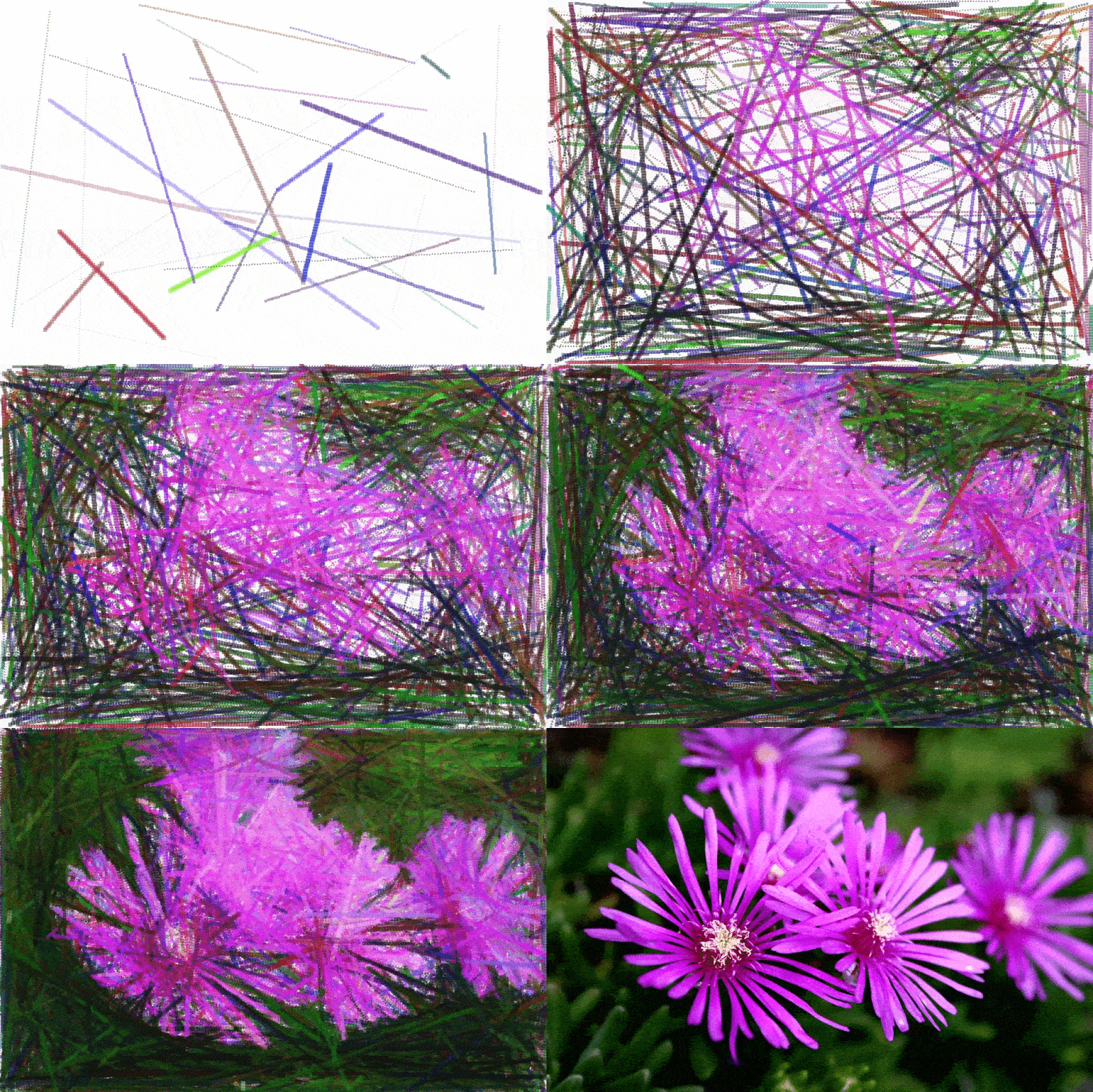
AI generated digital painting from start to finish demands planning. A diffusion model builds the base image from your prompt. You refine flaws and widen the scene with focused editing. Upscaling then lifts the result to a crisp print resolution. Human direction guides each stage of the final painted canvas.
AI Painting Prompt Builder
Pick a subject, medium, lighting, and brushstroke intensity to assemble a painterly prompt you can paste into any AI art tool.
How Diffusion Models Turn Words Into Painterly Images
Every AI generated digital painting begins with a diffusion model that learns to turn random noise into coherent structure. During training, the model studies millions of images paired with text descriptions until it links words to visual patterns. When you submit a prompt, the system starts from a field of static and removes noise step by step. Each step nudges the pixels closer to something that matches your description. The result is not copied from one source but synthesized from learned patterns across the dataset. This is why two identical prompts can still produce two different paintings. Understanding this process helps you write prompts that steer the model rather than fight it.
The painterly quality comes from how the model interprets style cues buried in your text. Words like impasto, gouache, or palette knife push the output toward textured brushwork instead of photographic smoothness. The model has seen labeled examples of each medium, so it can approximate their look on demand. Modern systems build on the same neural foundations described in our primer on how neural networks work. They also share lineage with earlier generative adversarial networks that first proved machines could invent convincing images. Diffusion later overtook those methods because it trains more stably and scales to higher resolution.
Resolution and detail depend on the model architecture and the compute behind it. Larger models capture finer texture, subtle lighting, and more believable edges between forms. Smaller or older models often blur fine detail and struggle with hands or readable text. The 2026 generation of tools renders native two-thousand-pixel output, a leap that makes brushstroke detail far easier to preserve. That extra resolution carries directly into the upscaling stage later in this workflow. Knowing where detail is gained or lost lets you plan each step with intent.
Picking a Tool That Matches Your Painting Style
Choosing the right tool is the single biggest decision in any AI generated digital painting workflow. Midjourney remains the favorite for cinematic, painterly results with rich lighting and texture. Stable Diffusion gives technical artists full control through local installation, custom models, and fine-tuned checkpoints. Adobe Firefly trains on licensed and stock imagery, which makes it the safer pick for commercial work. DALL-E and Ideogram handle text inside images better than most rivals today. You can compare leading options in our roundup of the best AI painting generators.
Beyond the headline names, your chosen style should drive the final pick. A concept artist chasing dramatic fantasy scenes may prefer Midjourney, while a studio needing repeatable characters leans on Stable Diffusion. Illustrators who sell stylized prints often test several engines, including dedicated anime-focused art generators for character work. Each platform has a distinct default aesthetic that shows through even with careful prompting. Run the same prompt across two or three tools before committing to one for a project. The cost of switching grows once you build a refined prompt library.
Writing Prompts That Produce Convincing Brushstrokes
With that base in place, a strong prompt is the difference between a flat render and a painting that looks touched by a human hand. Start with the subject, then layer the medium, the lighting, the mood, and a compositional cue. Texture words such as thick visible brushstrokes or palette knife marks pull the model out of photo territory. Strong prompts are the heart of AI generated digital painting from start to finish. Naming a movement, like Impressionism or Baroque chiaroscuro, anchors the color and contrast. Avoid stuffing twenty competing adjectives, since the model dilutes each one as the list grows. Read your prompt aloud and cut any word that does not change the image you picture.
Building on that foundation, structure matters as much as vocabulary. Place the most important elements first, because many models weight early tokens more heavily. Use negative prompts to remove unwanted artifacts like extra fingers, watermarks, or muddy backgrounds. Reference a lighting direction, such as warm rim light from the left, to give the scene depth. Beginners often find it easier to start inside a conversational tool, and our walkthrough on how to create AI images with ChatGPT shows that gentler entry point. From there, graduating to a dedicated engine unlocks finer control over each variable.
Turning to iteration, your first prompt is a draft, not a verdict. Generate a small batch, then study which seed or variation comes closest to your vision. Lock that seed and adjust one variable at a time so you can see what each change does. Save every prompt that works, since a personal library compounds in value over months. A flexible general-purpose AI art generator can help you scout styles quickly before a final render. Treat prompting as a dialogue where each round teaches you the model's habits.
Among the most common mistakes is chasing perfection in a single pass. Real painters block in shapes, then refine, and your prompt strategy should mirror that rhythm. Begin loose to find a composition you love, then tighten the prompt to sharpen detail. Keep notes on which words trigger which textures across your chosen tool. Resist copying long prompts from social media without understanding each term. The artists who improve fastest are the ones who test deliberately and record what they learn.
Dialing In Resolution, Aspect Ratio, and Sampling
Beyond the prompt itself, settings decide whether your AI generated digital painting reads as crisp art or a soft thumbnail. Choose an aspect ratio before you generate, since reframing later forces the model to invent missing edges. Portrait suits character studies, while wide ratios favor landscapes and cinematic scenes. Higher base resolution preserves the fine texture you will need at the upscaling stage. Sampling steps control how many denoising passes the model runs before it stops. Too few steps leave noise, while too many waste time with little visible gain.
Building on those basics, guidance scale balances obedience against creativity. A low guidance value lets the model roam, which can yield surprising painterly accidents. A high value forces tight adherence to your prompt, sometimes at the cost of natural texture. Most painters find a middle range gives the richest results across a project. The DALL-E art generator hides many of these dials, while Stable Diffusion exposes all of them. Match the level of control to your patience and your project's stakes.
Stepping back from individual sliders, consistency is the real prize. Save the seed, sampler, and steps that produced a result you like. Reusing those values keeps a series of paintings visually coherent across many sessions. Document your settings in the same notes file you use for prompts. Small, controlled changes beat random experiments when you need repeatable output. This discipline pays off most when a client expects a matching set of images.
Guiding Composition With Reference Images and ControlNet
Building on those controls, reference images and ControlNet give you director-level command over where every element lands. ControlNet reads structure from an input image, such as a pose, depth map, or edge outline. The model then paints your prompt while respecting that underlying skeleton. This solves the hardest problem in composition, which is placing elements reliably. A rough sketch becomes a scaffold the model fills with color, light, and texture. The same approach descends from research into creative adversarial networks that generate art.
Shifting focus to practice, feed the model a reference only as strong as you need. A light conditioning weight keeps your composition while allowing painterly freedom. A heavy weight locks the pose almost exactly, useful for product or character consistency. Photographers often trace their own shots to keep full ownership of the source. Combining a reference image with a precise prompt is the most dependable route to a planned scene. This pairing turns a lucky generation into a repeatable technique.
Fixing Flaws With Inpainting and Expanding With Outpainting
From there, inpainting and outpainting are where a promising generation becomes a finished painting. Inpainting lets you mask a flawed region, such as a warped hand, and regenerate only that area. You keep everything that works and repair only what fails the eye. Write a focused prompt for the masked zone, describing the exact colors and textures you expect. The more detail you supply, the more control you keep over the corrected patch. Several rounds of small fixes usually beat one large, risky regeneration.
Beyond repairs, outpainting extends the canvas past its original border. You can widen a portrait into a full scene or turn a square into a sweeping landscape. Always write a prompt for the new region, even when the direction seems obvious from context. A clear instruction removes guesswork and keeps the extension consistent with the original. These editing skills overlap heavily with traditional AI image editing techniques. Mastering both gives you a repair kit for almost any imperfect result.
Stepping back from the mechanics, edit with restraint and intent. Over-painting a region can erase the happy accidents that made the image special. Zoom in to inspect edges where inpainted areas meet the original pixels. Feather your masks so seams blend instead of forming hard lines. Save a copy before each major edit so you can roll back a bad attempt. Patient, layered correction is the habit that separates polished work from rushed output.
Upscaling Toward a Gallery-Ready Canvas
Moving on, upscaling carries an AI generated digital painting from start to finish toward a sharp, hangable print. Most models output at moderate resolution, which looks fine on a phone but breaks down on canvas. A dedicated upscaler rebuilds detail using its own trained model, adding believable texture as it enlarges. For posters and canvas wraps, a four-times enlargement of a 1024-pixel base is the common target. That math takes a 1024-pixel image to roughly 4096 pixels, enough for large fine-art reproduction. Skipping this step is one of the most common reasons finished pieces look soft when printed.
Building on that base, file format matters more than beginners expect. Always save your working image as PNG rather than JPG before you upscale anything. JPG compression introduces artifacts that the upscaler then amplifies into visible smears. A clean PNG source gives dramatically sharper results after a four-times pass, as upscaler guides like LetsEnhance repeatedly stress. Keep a lossless master and export compressed copies only for the web. This habit protects every hour you invested in earlier stages.
Beyond raw size, the right upscaler depends on your subject. Some models specialize in faces, others in illustration, and a few in photographic realism. Test two upscalers on the same image and compare them at full zoom before deciding. Watch for over-sharpening, which can give skin and skies an unnatural plastic sheen. A subtle pass that preserves brushwork usually beats an aggressive one that invents fake detail. Treat the upscaler as a finishing tool, not a rescue for a weak generation.
Looking at the full chain, upscaling rewards the planning you did earlier. A high base resolution and a clean composition give the upscaler more honest detail to work with. Print at 300 dots per inch and size your canvas to the final physical dimensions. Soft-proof the colors if your printer provides a profile, since screens run brighter than paper. Order a small test print before committing to a large, expensive run. These final checks protect both your reputation and your materials budget.
Color, Mood, and Lighting Control During Generation
Beyond resolution, color and light carry the emotion of a painting more than any single object in the frame. Name a palette directly, such as muted earth tones or a cold blue twilight, to set the mood early. Describe the light source and its quality, because soft window light reads very differently from harsh noon sun. Color theory still applies, and deliberate harmonies make a piece feel composed rather than random. Our guide to tetrad color harmony with generative AI shows how structured schemes raise quality. A clear lighting plan keeps the model from defaulting to flat, even illumination.
Shifting focus to mood, atmosphere comes from contrast and restraint. A limited palette often feels more sophisticated than a rainbow of competing hues. Add atmospheric cues like morning haze, candle glow, or storm light to deepen the scene. Reference a painter or era when you want a recognizable emotional register. Keep one dominant color and let the others support it rather than compete. These choices give your work a consistent signature across a series.
Turning to refinement, color grading after generation is a legitimate final step. Pull the image into an editor and adjust temperature, contrast, and saturation with a light hand. Subtle grading can unify a set of paintings that were generated in separate sessions. Avoid heavy filters that flatten the painterly texture you worked to create. Compare your graded version against the original to confirm the change actually helps. Small, reversible adjustments give you a polished result without erasing the model's character.
Who Owns the Copyright and Whether You Can Sell It
Turning to the law, the right to sell an AI generated digital painting hinges on how much human authorship you can prove. On March 2, 2026, the United States Supreme Court declined to hear the Thaler appeal, leaving intact rulings that works without a human creator cannot be copyrighted, as Futurism reported. That decision does not ban selling AI art, but it weakens the protection around purely machine-made images. Documented prompting, editing, and compositing strengthen your claim to authorship. The legal terrain is shifting, and our explainer on AI copyright lawsuits in the US tracks the major cases. Treat copyright as a moving target rather than a settled rule.
Beyond registration, the platform you use shapes your commercial rights. Read each tool's terms, since some grant broad commercial use while others restrict it on free tiers. Adobe Firefly markets itself as commercially safe because it trains on licensed and stock material. Selling on print-on-demand sites may trigger their own AI disclosure rules. When a contract is large, a brief consult with an intellectual property lawyer is money well spent. Clarity up front prevents a painful dispute after a sale closes.
The Ethics of Training Data and Style Mimicry
Beyond the law, the ethics of AI generated digital painting center on whose work trained the model and whether they consented. Many image models learned from the LAION dataset, which scraped roughly five billion images from the open internet. Artists argue this amounted to mass copying of their work without permission or payment. The Andersen v. Stability AI case, heading toward a September 2026 trial, will test those claims in court. Style mimicry deepens the concern, since a prompt can imitate a living artist's signature look. Creators should weigh these issues before building a business on borrowed aesthetics.
Building on that tension, the industry is responding unevenly. Some vendors now offer opt-out mechanisms and artist compensation pools, while others resist. Major rights holders have pushed back hard, and the suit where Disney and Universal sue Midjourney signals how aggressive that pushback has become. Licensed-data models cost more to build but carry far less ethical and legal baggage. Transparency about training sources is slowly becoming a competitive feature. Buyers increasingly ask where a model's images came from before they commission work.
Turning to personal practice, you can work ethically within an imperfect system. Avoid prompts that copy a specific living artist's name and signature style. Prefer tools that disclose their training data and respect opt-out requests. Add enough original direction and editing that the result is genuinely yours. Brookings argues in its analysis of AI and the visual arts that stronger protections could realign these incentives. Credit your influences honestly rather than passing off imitation as invention. Ethical habits today protect both other artists and your own reputation.
Risks and Limitations Worth Weighing
Looking at the downsides, every AI generated digital painting carries practical risks that planning can reduce but not erase. Models still mangle hands, text, and complex reflections, which forces manual correction. Output can drift toward generic, over-trained looks that flood the same stock-art aesthetic. Platform terms change without notice, and a tool you depend on can restrict commercial use overnight. Generated images may unintentionally echo a copyrighted work, exposing you to a takedown or claim. These limitations make documentation and human editing essential rather than optional.
Shifting focus to dependence, over-reliance on one tool is its own hazard. Prices rise, models get deprecated, and accounts can be suspended without much recourse. Keep local backups of your masters and avoid storing the only copy in a vendor cloud. Diversify across two engines so a single outage cannot halt your work. Misuse also matters, since the same technology powers convincing fakes and synthetic media. Treat the technology as powerful but fallible, and build safeguards around it.
What AI Painting Means for Working Illustrators
Stepping back, AI generated digital painting from start to finish is reshaping the economics of illustration faster than any tool before. Routine work like spot illustrations and quick concept art now faces real price pressure. Some clients expect lower rates because a first draft can appear in seconds. Yet demand for distinctive human vision and art direction has held firm or grown. The debate over AI versus human creativity sits at the center of this shift. Illustrators who adapt their offering tend to fare better than those who ignore it.
Building on that reality, many artists now fold AI into their pipeline. They use it for ideation, mood boards, and rapid client previews while keeping final craft by hand. With over 80 million images produced daily, raw generation is abundant and curation becomes the scarce skill. Knowing which output to keep, fix, or discard is increasingly the value an artist sells. Hybrid studios pair human concepting with machine speed to win on both quality and turnaround. The market rewards judgment more than mere production capacity.
Turning to careers, new roles are emerging around this technology. Prompt designers, AI art directors, and model fine-tuners did not exist a few years ago. Teaching, licensing, and curation offer income streams beyond selling finished pieces. Artists who document a transparent, ethical process can command a trust premium. Building an audience around your method matters as much as the images themselves. The illustrators thriving in 2026 treat AI as a collaborator, not a replacement.
The Future of AI Generated Digital Painting
Looking ahead, the future of AI generated digital painting from start to finish points toward faster, more controllable, and more accountable tools. Real-time canvases now let artists paint while the model renders alongside each stroke. Native two-thousand-pixel output in the 2026 model generation has already shrunk the upscaling burden. Provenance watermarking and content credentials are spreading to label what a machine helped make. These signals help buyers, platforms, and courts trace an image back to its origin. The direction of travel favors transparency rather than anonymous, untraceable output.
Building on those advances, the market keeps expanding quickly. Fortune Business Insights projects the AI image generator market growing toward USD 1.75 billion by 2034 at a 17.4 percent compound rate. That growth funds better composition control, cleaner training data, and tighter editing tools. Licensed-data models are likely to gain share as legal pressure mounts. Expect deeper integration between painting tools and motion or three-dimensional output. The line between still painting and animated scene will keep blurring.
Shifting focus to craft, the human role is evolving rather than vanishing. Tools will handle more rendering, freeing artists to focus on concept, story, and taste. Many practitioners already describe the model as a partner, a view echoed in pieces on embracing AI as a creative collaborator. The most valuable skill becomes directing a machine toward a vision only you can see. Curation, editing, and ethical sourcing will define professional quality. Artists who master that blend will lead the next phase.
Looking at the bigger picture, accountability will mature alongside capability. Clearer licensing, artist compensation, and provenance standards are slowly taking shape. Courts will settle questions that today feel uncertain, giving creators firmer ground. The painters who win will combine technical fluency with honest practice. AI generated digital painting from start to finish is not the end of art but a new medium with its own discipline. The craft now is learning to wield it with both skill and conscience.
AI Image Generator Market Growth, 2026 to 2034
Global market size in USD millions. Chart type: horizontal bar, comparing size across milestone years.
Source: Fortune Business Insights, AI Image Generator Market (17.4% CAGR, 2026-2034).
How to Create an AI Digital Painting Step by Step
In practice, start every AI generated digital painting from start to finish with a clear idea of the final piece. Write a one-line concept that names the subject, mood, and intended use before you touch a tool. Collect two or three reference images for pose, lighting, and color, keeping ownership in mind. A short mood board prevents your prompt from drifting during later iterations. Decide the final output size now, because that choice shapes your base resolution. This planning step takes minutes and saves hours of aimless generation. Treat it as the sketchbook stage of a traditional painting.
Next, translate your concept into a structured prompt that the model can follow. Lead with the subject, then add medium, style, lighting, and composition cues in order. Include texture words so the output reads as paint rather than a photograph. Pro tip: change only one variable at a time so you can see exactly what each word does. Keep a running file of prompts that worked, since that library compounds in value. Read the prompt aloud and delete any term that does not change the image. A tight prompt beats a long one almost every time.
oil painting of a lighthouse at dusk, thick visible brushstrokes, palette knife texture, warm rim light from the left, stormy teal sky, Impressionist style, 3:2 aspect ratio --negative: watermark, text, extra hands, blurry
From there, generate four to eight variations rather than a single image. Review the batch and pick the composition closest to your concept. Note the seed number of your favorite so you can reproduce and refine it. Lock that seed, then adjust one prompt term to push the result further. Resist the urge to accept the first decent output you see. A short comparison now produces a stronger base for every later step. Save the winning generation as a lossless PNG master before editing.
With that base chosen, zoom in and find the regions that fail the eye, such as warped hands or muddy edges. Mask only the problem area so the rest of the painting stays untouched. Write a focused prompt describing the exact colors and textures for that patch. Run several small inpainting passes instead of one risky full regeneration. Feather the mask so the repaired zone blends without a hard seam. Inspect the boundary at full zoom before you accept the fix. Save a new copy after each successful repair.
Moving on, decide whether the composition needs more room to breathe. Use outpainting to extend the canvas in the direction your scene calls for. Write a prompt for the new region even when the extension seems obvious. Match the lighting and palette of the original so the addition feels native. Generate a few options and choose the one with the cleanest transition. Outpainting can rescue a strong subject trapped in a cramped frame. Stitch and review the full image before moving on.
Next, send your finished PNG master into a dedicated upscaler for resolution. Choose a two-times pass for small prints or a four-times pass for posters and canvas. Compare the result at full zoom and watch closely for over-sharpening. Pick the upscaler that best preserves your brushwork rather than the one adding fake detail. Confirm the final pixel dimensions match your print size at 300 dots per inch. A simple command-line workflow keeps the process repeatable across many pieces.
# Example: 4x upscale with a local Real-ESRGAN model
python inference_realesrgan.py -n RealESRGAN_x4plus -i lighthouse_master.png -o lighthouse_4x.png --outscale 4
Finally, export a print-ready master and separate, smaller copies for the web. Keep your prompt, seed, and edit history in a notes file beside the image. That record documents your human authorship if you later license or sell the work, and it pairs with tools like Midjourney's image-to-video tool for motion versions. Add a subtle signature or visible watermark on public copies. Store the lossless master in two places so a drive failure cannot erase it. Label files clearly so a buyer or printer never receives the wrong version. Good documentation is the quiet professional habit that protects your rights.
Key Insights on AI Generated Digital Painting
- The global AI image generator market reached USD 484.29 million in 2026 and is forecast to hit USD 1.75 billion by 2034 at a 17.4 percent CAGR (Fortune Business Insights).
- More than 150 million people use AI image generators each month, collectively producing roughly 80 million images every day (Imagera AI statistics).
- North America led the market with a 40.34 percent share in 2025, ahead of Europe and Asia-Pacific (Grand View Research).
- The Andersen v. Stability AI class action heads to trial on September 8, 2026, centered on the LAION dataset of five billion scraped images (NYU JIPEL).
- On March 2, 2026, the US Supreme Court declined the Thaler appeal, leaving intact that works without a human creator cannot be copyrighted (Futurism).
- Getty Images sued Stability AI over the alleged use of more than 12 million copyrighted images without permission (Mogin Law).
- At least 16 copyright lawsuits have been filed against nearly every major AI company in roughly two years (Built In).
- Midjourney V8, launched March 17, 2026, introduced native two-thousand-pixel resolution and roughly five-times faster generation (CogitoDaily review).
Read together, these numbers describe a medium that is growing fast while its legal foundation is still being poured. Adoption is enormous, with tens of millions of creators and tens of millions of images produced daily across the major platforms. The technology keeps improving, as native high-resolution output in 2026 removes friction that once slowed every workflow. Yet copyright remains unsettled, with a landmark trial and a Supreme Court signal both landing in 2026. The practical lesson is to embrace the tools while documenting your human authorship and respecting training-data ethics. That balance of opportunity and caution defines responsible practice today.
Comparing the Major AI Painting Platforms
Choosing among the major platforms is easier once you see their strengths side by side. Each engine trades control for convenience in a slightly different way. Midjourney rewards speed and painterly polish with less manual tuning. Stable Diffusion rewards patience with near-total control over every parameter. Adobe Firefly trades some flair for licensed training data and commercial peace of mind. The table below compares the dimensions that matter most when you commit to a tool. Use it as a starting filter, then test your shortlist on a single shared prompt.
| Dimension | Midjourney | Stable Diffusion | Adobe Firefly | DALL-E |
|---|---|---|---|---|
| Best for | Painterly, cinematic art | Full technical control | Commercial, safe assets | Conversational creation |
| Painterly quality | Excellent | Very good with tuning | Good | Good |
| Control and customization | Moderate | Highest (local, custom models) | Moderate | Low to moderate |
| Inpainting and outpainting | Supported | Extensive | Supported (Generative Fill) | Supported |
| Max native resolution | 2K (V8, 2026) | Depends on model and hardware | High | Moderate |
| Commercial-use safety | Check terms | Depends on model license | Strong (licensed data) | Check terms |
| License clarity | Moderate | Varies by checkpoint | High | Moderate |
| Learning curve | Low to moderate | Steep | Low | Low |
| Pricing model | Subscription | Free to self-host or paid API | Subscription or credits | Credits or API |
Where AI Painting Earns Its Keep in Practice
Cosmopolitan's DALL-E Magazine Cover
In June 2022, Cosmopolitan rolled out what it billed as the first magazine cover produced with OpenAI's DALL-E 2 system. The team ran many prompt iterations before landing on a striking astronaut image for the final render. Once the direction was clear, producing a usable frame took only minutes rather than a full studio day. That speed showed how quickly a strong concept can appear with the right prompt. The limitation was real, since the cover still required extensive human art direction, curation, and retouching to meet print standards. The project, documented by Cosmopolitan, proved AI could enter mainstream publishing. It also made clear that machine output still depends on skilled people.
Google's Chimera Painter for Creature Concept Art
Google deployed Chimera Painter, a browser-based tool that turns rough painted shapes into fully rendered fantasy creatures. Artists ran loose color blocks through the model and received textured, believable creature art almost immediately. The outcome cut early concept time by hours, letting designers explore dozens of variations in one session. Our breakdown of Google's Chimera Painter details how the GAN-based system works. The limitation was scope, since the model was trained narrowly on creatures and struggled outside that domain. It still required an artist to block in the initial shapes before the model could help. Even so, it demonstrated sketch-guided generation years before ControlNet made the idea mainstream.
Adobe Firefly Generative Fill in Photoshop
Adobe rolled out Firefly-powered Generative Fill inside Photoshop in 2023, trained largely on licensed Adobe Stock imagery. Users generated and extended image regions directly on the canvas with a simple text prompt. That convenience drove a sharp increase in everyday use of inpainting and outpainting among mainstream designers. The commercial-safety angle, covered widely after the Firefly launch, addressed a core fear about training data. The limitation surfaced in content restrictions and occasional artifacts that still needed manual cleanup. Some edge cases still required a designer to finish the blend by hand. For many studios, the licensed-data foundation outweighed those rough edges.
Studios Putting AI Painting Into Production: Real Case Lessons
Case Study: Marvel's Secret Invasion Title Sequence
Marvel used generative AI tools for the 2023 Secret Invasion opening title sequence, produced with Method Studios. The team built the shifting, painterly visuals to match the show's shape-shifting theme. The outcome arrived in days rather than the weeks a traditional hand-animated sequence would need. That turnaround let the production hit a tight delivery window without a large extra crew. The drawback was severe public backlash, as many artists criticized the choice during ongoing industry labor disputes. Coverage by The Verge captured the controversy in detail. The case shows that production speed can carry a real reputational cost.
Case Study: Coca-Cola's Masterpiece Campaign
Coca-Cola deployed generative AI in its 2023 Masterpiece advertisement, blending Stable Diffusion with classical artworks and live action. The campaign animated famous paintings passing a Coke bottle, a concept that would have been costly with traditional VFX alone. The outcome drove a measurable increase in social engagement and earned media for the brand. The spot reached a global audience within days of release across television and social platforms. The limitation required heavy human compositing and licensing work to combine real artworks legally and cleanly. Reporting from Campaign noted the hybrid human and machine pipeline behind it. It illustrated AI painting as one ingredient in a larger, carefully managed production.
Case Study: Wizards of the Coast and Magic: The Gathering
Wizards of the Coast faced a public dispute in 2024 after AI-generated imagery appeared in Magic: The Gathering marketing despite a stated no-AI policy. The company had used an outside vendor whose work included machine-generated elements without disclosure. The immediate outcome was a swift public apology and a tightening of contributor guidelines within days. That fast response limited the damage but could not undo the initial loss of community trust. The episode exposed a supply-chain problem, since AI content can enter a pipeline through third parties unnoticed. Reporting by Polygon traced how the imagery slipped through review. The lesson underscores why provenance tracking is becoming a production requirement.
Reference Link Map
The links below map every reference used across this guide. Internal cluster links connect to pillar articles on AI art and tools. Rescue links point to deeper, less-linked posts in the same topic. External links cite the primary sources behind each statistic and claim. Use this table to verify a source or explore a related topic. Every internal URL resolves to a live post on the site.