

Introduction
LinkedIn integrates AI for job seekers in a strategic move to enhance the job application experience using cutting-edge technology. As artificial intelligence reshapes recruiting and professional networking, LinkedIn has unveiled powerful AI tools designed to help job seekers craft winning resumes, generate effective messaging to recruiters, and personalize their entire application process. Whether you are entering the workforce or pursuing your next position, understanding how LinkedIn’s AI functions can offer a measurable advantage in today’s fast-evolving employment landscape.
Key Takeaways
- LinkedIn AI tools now assist with resume writing, messaging recruiters, and profile enhancement.
- The integration of generative AI aims to make job applications faster, more efficient, and tailored to individual users.
- LinkedIn’s AI adoption aligns with broader recruitment trends, which show a sharp rise in AI-driven job-matching platforms.
- These tools have limitations that job seekers must be aware of, including the need for personalization and ethical caution.
Understanding LinkedIn’s New AI Job Tools
LinkedIn’s latest update includes a suite of generative AI enhancements specifically designed to reduce friction in the job-seeking process. Some of the most notable features include:
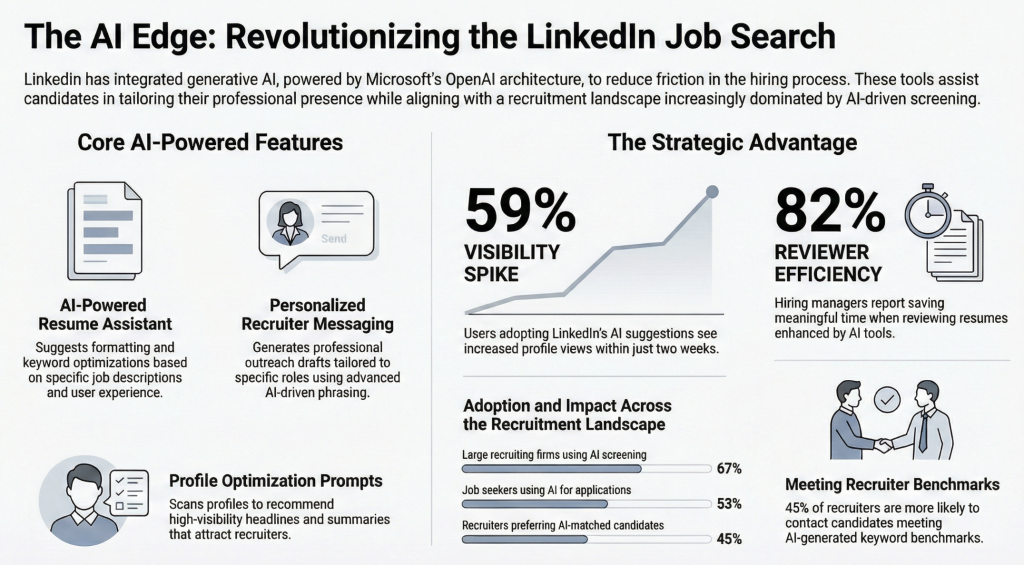
- AI-Powered Resume Assistant: This tool uses large language models to suggest improvements to formatting, keyword optimization, and content clarity based on both job descriptions and user experience.
- Personalized Messaging Prompts: With AI-driven phrasing, LinkedIn assists users in messaging recruiters or hiring managers using professional language that suits specific roles and industries.
- Profile Optimization Suggestions: AI scans a user’s profile and recommends updates, such as more compelling summaries, refined headlines, and tailored descriptions to improve visibility to recruiters.
These tools are powered through Microsoft’s OpenAI integration. Much of the back-end architecture relies on the same advanced GPT models found in ChatGPT.
How LinkedIn AI Tools Compare to Other Platforms
LinkedIn is not alone in offering AI-powered support for job seekers. Competing platforms also utilize similar technology:
- Indeed’s Smart Apply: Uses resume parsing and role matching algorithms to highlight top candidates matched to job criteria.
- ZipRecruiter’s AI Match: Matches users with relevant roles using machine learning and feedback data drawn from prior engagement.
- Glassdoor’s Review Analyzer: Offers AI experiments that aim to deliver smarter insights from employer reviews and cultural signals.
LinkedIn stands out due to its massive professional network and seamless AI integration. This network effect, combined with tools backed by Microsoft’s ecosystem, makes LinkedIn a leader in AI-assisted job applications.
Recruitment Trends: AI in Job Search for 2023 to 2024
Artificial intelligence is already shaping how employers and job seekers approach hiring. A 2023 report from Statista states that over 67% of large recruiting firms are currently using AI to screen applications. LinkedIn’s internal data reveals that 45% of recruiters are more likely to contact candidates who meet AI-generated keyword benchmarks.
Other notable statistics include:
- 53% of job seekers now use AI to help with resumes or applications.
- 82% of hiring managers report saving meaningful time when reviewing AI-enhanced resumes.
- 59% of users who embrace LinkedIn’s AI suggestions experience a spike in profile views within two weeks.
This shift highlights a new dynamic where those embracing AI tools gain a clear strategic edge. To better understand how AI is changing the career landscape, explore this breakdown on how AI is changing job hunting.
Practical Guide: How to Use LinkedIn’s AI Tools
Having access to LinkedIn’s AI suite is valuable only if used with care. Below is a simple guide to making the most of the platform’s features.
1. Activate Resume Suggestions
Under your LinkedIn profile, click “Build a resume.” Use the AI suggestion tool to upload your current resume or generate a new one based on your profile. Recommendations will be aligned with the job descriptions you’re targeting and include keyword enhancements.
2. Send Smarter Recruiter Messages
When messaging a recruiter, click “Message” and review the AI-generated prompt. This will suggest a draft message based on the job role, employer, and your work history. Edit the content for tone and accuracy to ensure it represents your voice.
3. Optimize Your Profile With AI Prompts
LinkedIn regularly displays suggestions on pages such as your “About” section. Click these for AI-generated revisions that reflect trends in your field. Refine each option before applying the changes to maintain authenticity.
4. Test, Track, Refine
Use your dashboard to observe metrics like profile visits, response rates, and job clicks. Refine your language and layout based on results. This iterative approach builds a dynamic and responsive profile over time.
Important Caveats and Ethical Considerations
AI support can be powerful, but it is not without risks. Keep these cautions in mind:
- Generic Output: Heavily relying on AI text can create content that feels impersonal. Recruiters often prefer genuine, specific narratives.
- Bias Challenges: AI may reproduce biases found in the data it was trained on. Review all suggestions with an objective lens before use.
- Data Sensitivity: AI recommendations require access to your data. Be thoughtful about what you upload and how it is used.
- Human Value Remains Critical: AI can sharpen your application, but your core skills still matter most. Stay focused on learning and career growth.
To explore how automation may impact your career track, see this report on jobs most protected from AI.
FAQ: AI and LinkedIn Job Search Tools
How does LinkedIn use AI for job seekers?
LinkedIn uses AI to enhance resume creation, suggest recruiter messages, recommend profile edits, and connect job seekers with relevant roles based on their traits and goals.
What is the new AI tool in LinkedIn?
The standout new tool is the AI-powered resume assistant. It uses GPT-driven language models to help users tailor resumes more effectively for specific job listings.
Are LinkedIn’s AI features free?
Most AI tools including resume and message suggestions are available to all users. Some premium capabilities, such as advanced analytics, may require a LinkedIn Premium subscription.
Can AI help with writing a resume?
Yes. LinkedIn’s tool can extract keywords from job ads and adjust your resume for clarity, structure, and relevance. Be sure to review results carefully for tone and accuracy.
How does LinkedIn compare to other platforms using AI for job search?
LinkedIn leads this space thanks to its robust user data, networking tools, and integration with Microsoft technologies. Read more on the rise of AI-generated LinkedIn content to understand its advantages.
Final Thoughts: A Smart Next Step for Career Growth
The role of AI in job search is no longer experimental. It is fundamental. LinkedIn’s AI offerings meet today’s demands with timely applications that support real progress. From writing resumes to reaching recruiters, the platform now lets candidates deploy data-enhanced strategies without leaving the interface. To thrive, users should apply these resources with both savvy and authenticity. For broader insight, visit this overview of AI and the future of work, which explains how digital tools continue to shape employment strategies around the globe.
References
- CNBC, “LinkedIn Adds AI Features to Help Users Land Jobs Faster”