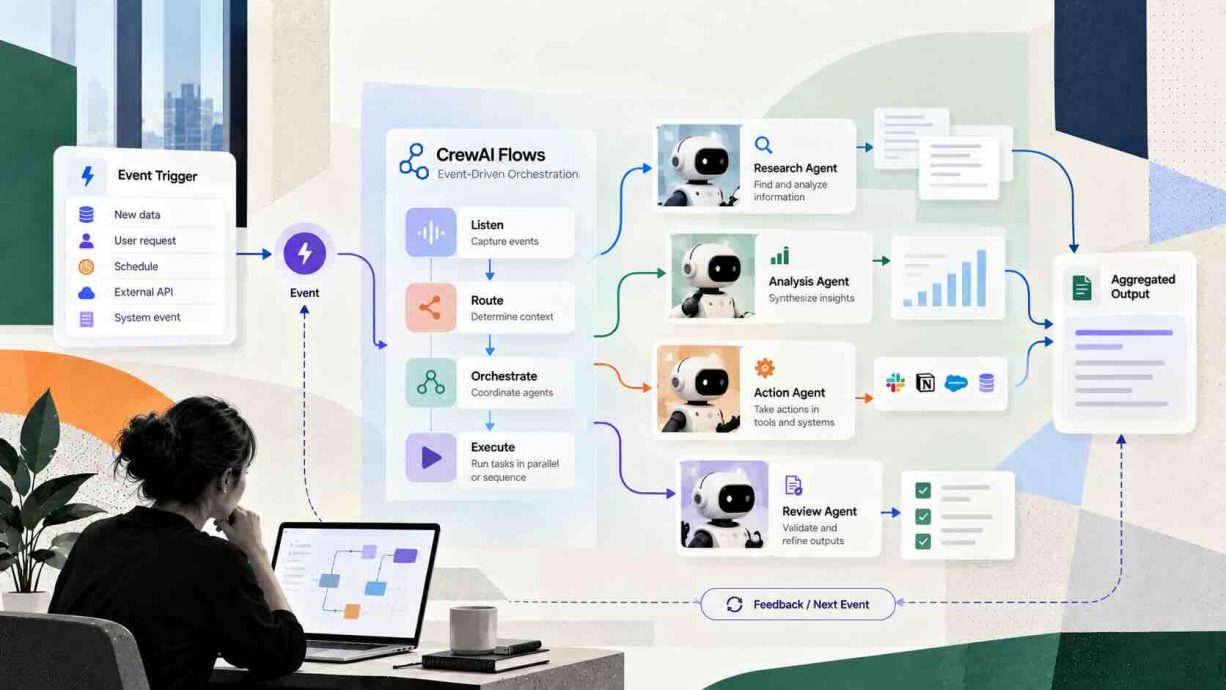

Introduction
This guide has CrewAI Flows event-driven agent orchestration explained from the decorator level up, because that is where agent projects break. A Crew improvises, and that improvisation is exactly what an auditor, a finance lead, or an on-call engineer cannot accept. Flows add a deterministic layer around those agents, with typed state, explicit branches, and a recorded event for every step. The stakes are no longer theoretical, since a CrewAI enterprise survey reported by Business Wire found that every enterprise polled plans to expand agentic AI during 2026. Teams that scale agents without orchestration discipline end up debugging eight moving parts at once, usually during an incident. The sections below cover the event model, the state model, the failure modes, and the frameworks competing for the same job. By the end you will know when a Flow is the right tool and when a plain Crew is enough.
Quick Answers on CrewAI Flows and Event-Driven Orchestration
What is CrewAI Flows event-driven agent orchestration explained in one sentence?
A Flow is a Python class whose decorated methods emit and listen for events, giving multi-agent workflows deterministic ordering, typed state, conditional branches, and persistence between runs.
How is a Flow different from a Crew?
A Crew is role-based and lets the model improvise task order. A Flow is code-first and event-driven, so the execution path is decided by decorators rather than by model judgment.
When should a team choose Flows over a plain Crew?
Choose Flows when the work needs auditable ordering, conditional branching, crash recovery, or coordination across several crews. Choose a Crew when the task is exploratory and step order genuinely does not matter.
Key Takeaways
- CrewAI Flows event-driven agent orchestration explained in one line: a Flow fixes the execution path while crews keep the content generative.
- Three decorators carry most of the weight: start marks entry points, listen wires steps together, and router selects a branch by label.
- Typed Pydantic state plus persistence turns an agent script into a resumable, inspectable, forkable production job.
- Determinism in the graph does not guarantee correctness in the steps, so budgets, iteration caps, and branch monitoring still matter.
Table of contents
- Introduction
- Quick Answers on CrewAI Flows and Event-Driven Orchestration
- Key Takeaways
- What Is a CrewAI Flow in Plain Terms
- The Event Model That Makes Flows Deterministic
- How Crews and Flows Divide the Orchestration Work
- Inside the start Decorator and Flow Entry Points
- Wiring Steps Together With the listen Decorator
- Conditional Branching With the router Decorator
- Joining Signals With or_ and and_
- Structured Versus Unstructured Flow State
- Persistence, Checkpoints, and Crash Recovery
- Human Feedback Gates Inside an Automated Flow
- Tracking Token Spend Across an Entire Flow
- Where Graph Frameworks Like LangGraph Diverge
- Google ADK 2.0 and the Hierarchical Delegation Model
- Microsoft Agent Framework and Durable Superstep Workflows
- A2A, MCP, and Cross-Framework Interoperability
- Putting Flows to Work Inside an Enterprise Stack
- Where Event-Driven Orchestration Falls Short
- Ethics, Accountability, and Auditable Automation
- The Future of Event-Driven Agent Orchestration
- How to Build Your First CrewAI Flow Step by Step
- Key Insights
- How Flows, Crews, and Graph Frameworks Compare
- CrewAI Flows in Practice Across Production Teams
- Lessons From Teams Running Flows at Scale
- Frequently Asked Questions About CrewAI Flows
What Is a CrewAI Flow in Plain Terms
CrewAI Flows event-driven agent orchestration explained simply: a Flow is a Python class whose decorated methods fire on events, carry typed state, and route work to Crews. Execution order is written in code, not improvised by a model.
An Interactive From AIplusInfo
Crew or Flow: an orchestration fit explorer
Set the shape of your workflow and see which CrewAI pattern fits, how much routing you are asking a model to guess, and where recovery matters.
Linear multi step pipeline
Medium: rerun costs an hour
2,000
60%
Recommended pattern
Flow around crews
Structure fit score
65 / 100
Routing decisions per month
1,200
A Flow fixes the execution path in code while crews keep generating the content.
Benchmark anchor: Gelato reports carrier integration falling from 5 days to 10 minutes after embedding CrewAI agents, per its agentic integration case study. Scores are a planning heuristic, not a benchmark result.
The Event Model That Makes Flows Deterministic
An event inside a Flow is nothing exotic, since it is simply the completion of a decorated method carrying that method’s return value. The runtime keeps a registry of which methods listen for which events, then dispatches work as each event fires. That dispatch table is built when the class is defined, so the graph of possible paths exists before a single token is spent. The official CrewAI Flows documentation describes this as an event-driven architecture layered on top of ordinary Python methods. Because the wiring is static, you can render the whole graph with the plot helper and hand the picture to a reviewer. Nothing about the shape of the run depends on what a model happens to decide in the moment.
Determinism here means the control flow is fixed while the content stays generative. A Crew can still call tools, reason freely, and produce different prose on every run inside a single step. What cannot change is which step runs next, because that decision belongs to the decorator graph rather than to the model. Teams working through mastering agentic AI for smarter workflows usually discover this distinction late, after a demo behaves differently in front of a customer. Separating the two layers is what makes replay, regression testing, and honest incident review possible. It also means a failed run can be reproduced with the same inputs along the same path.
Events also give you a natural instrumentation surface, because every transition can be logged without touching business logic. CrewAI emits a large event catalog covering flows, methods, tools, memory, guardrails, and agent-to-agent delegation. Subscribing to those events is how observability, checkpointing, and cost tracking all attach to the same run. A Flow therefore behaves less like a script and more like a small state machine with a message bus underneath. That framing is worth holding onto, because it predicts most of the design decisions that follow. It also explains why the same primitives show up in every serious orchestration framework shipped since 2024. That is CrewAI Flows event-driven agent orchestration explained at the level a code reviewer actually needs.
How Crews and Flows Divide the Orchestration Work
A Crew is a team of agents with roles, goals, and tasks, and it runs once to completion. The CrewAI Crews reference treats the crew as the unit of collaboration, where the process type decides whether tasks run in sequence or through a manager. Nothing in that model remembers a previous run, and nothing in it branches on a business rule. A Flow sits one level above and treats each crew as a callable step inside a larger program. That division is the single most useful mental model for anyone new to the framework. Crews supply judgment, and Flows supply the sequence that judgment operates inside.
The practical test is whether the order of work is a business requirement or an implementation detail. Drafting three marketing angles in any order is an implementation detail, so a Crew handles it well. Deciding whether a loan application goes to automated approval or manual review is a business requirement. Encoding that rule in a prompt makes it unreviewable, while encoding it in a router makes it testable. Teams who build custom AI agents for automation tend to start with crews and migrate the rules outward as the stakes rise. That migration is normal and does not mean the original crew was a mistake.
Flows also solve the composition problem that crews alone cannot touch. One crew can produce a book outline while another writes chapters against it, with the flow holding the shared artifact between them. Without that layer you end up passing raw strings between scripts and losing every intermediate result on failure. The flow state becomes the contract, and each crew reads and writes named fields on it. Reviewers can then inspect state rather than reading transcripts to work out what actually happened. This is why multi-crew programs almost always end up inside a Flow eventually.
There is a cost to the split, and it is mostly conceptual overhead on small projects. A two-agent research task wrapped in a Flow gains ceremony without gaining much real control. CrewAI keeps both patterns first class rather than deprecating crews in favour of flows. Choosing well means asking how much of the run you need to guarantee in advance. That question has CrewAI Flows event-driven agent orchestration explained in one line: guarantee the path, generate the content. Start with the smallest structure that makes the run reviewable.
Inside the start Decorator and Flow Entry Points
With that division clear, the entry point is the natural place to begin reading any flow. The start decorator marks a method as an entry point, and every satisfied start method executes when the flow begins or resumes. You can declare several unconditional starts, and they often run in parallel rather than in the order you wrote them. A start can also be gated on a prior method or a router label, which turns it into a conditional re-entry point. The flow decorator reference documents a callable condition form as well, for cases where the gate is computed at runtime. Reading the start methods first tells you every way a run can begin.
Multiple entry points are the feature most teams misuse on their first attempt. Declaring three unconditional starts means three parallel branches, each writing into the same state object. Without a join, downstream listeners may fire before every branch has written its field. The fix is to declare one start and let listeners fan out, or to join explicitly further down. Flow state carries an automatically generated identifier, so parallel writes stay traceable even when ordering surprises you. Treat the start set as the public interface of the flow and keep it deliberately small.
Wiring Steps Together With the listen Decorator
From there, the listen decorator does the actual wiring between steps. A method decorated with listen executes when the named method emits an output, and it receives that output as an argument. You can pass the method object directly or pass its name as a string, and both forms behave identically. Chaining several listeners produces a linear pipeline without any explicit scheduler, queue, or broker. The pattern feels familiar to anyone who has used function calling in LLMs to hand structured results between steps. The difference is that the handoff here runs code to code rather than model to code.
Listeners are where most of a production flow’s real logic lives. A listener can call a crew, call a single agent, invoke a bare LLM call, or run plain Python with no model at all. Mixing deterministic code and generative steps inside one graph is the entire point of the abstraction. A validation listener running a regular expression costs nothing and catches malformed input before an expensive crew starts. Ordering those cheap checks ahead of expensive work is the easiest cost optimisation available in the framework. Nothing forces a listener to touch a model, and many of the best ones never do.
Return values matter more than they first appear, because the final method to complete supplies the flow result. If the last listener returns nothing, the kickoff call returns nothing and the caller loses the output entirely. Writing results into state as well as returning them avoids that whole class of confusion. State also survives across branches, while a return value only travels along one edge of the graph. Keeping both habits makes flows easier to refactor when a new branch arrives six months later. The discipline costs one extra line per method and saves hours during debugging. Anyone who wants CrewAI Flows event-driven agent orchestration explained through a single decorator should start with this one.
Conditional Branching With the router Decorator
Beyond linear chaining, the router decorator is what turns a pipeline into a decision tree. A router method inspects state, returns a plain string label, and that label activates any listener registered for it. Listeners subscribe to labels exactly as they subscribe to methods, which keeps the mental model small. The routing decision therefore lives in ordinary Python that a reviewer can read and a unit test can cover. Building deterministic guardrails for AI agents becomes straightforward once the branch condition is a function rather than a prompt. Labels are cheap, so many production flows define five or six of them.
A router that reads model output and returns a validated label is the safest way to let a model influence control flow. The model produces a classification, the router checks it against an allowed set, and the flow branches on the validated value. An unexpected value can fall through to a default label instead of crashing the run outright. That pattern keeps invented branch names from ever reaching the scheduler. Teams who skip validation eventually find a label matching no listener and a run that ends silently. A single assertion inside the router prevents that failure mode completely.
Routers also compose with persistence in a useful way, because the chosen label becomes part of the recorded state. Replaying a run then tells you not only what the agents said but which branch the system took. Auditors care far more about the branch than about the prose, particularly in regulated workflows. A flow without routers can only be audited by reading transcripts, which does not scale past a handful of runs. Adding routers early is much cheaper than retrofitting them after a compliance review. The cost is a few extra methods and a clearer diagram.
Joining Signals With or_ and and_
Next, the or_ and and_ helpers handle cases where one listener depends on several upstream methods. Wrapping two methods in or_ fires the listener whenever either one emits an output, so it runs twice if both complete. Wrapping them in and_ holds the listener until every named method has emitted, which is a true join. The CrewAI source repository keeps both helpers in the same module as the decorators, so they import together. Choosing between them is usually a question of whether you want a logger or a gate. A logging listener wants or_, and an aggregation gate wants and_ instead.
Misreading or_ as a join is one of the most common bugs in early flows. A logging listener wrapped in or_ runs once per upstream completion, duplicating writes if it appends to state. An aggregation step wrapped in or_ runs before the second branch finishes and produces a partial result. Switching that single helper to and_ fixes both symptoms without touching any other code. Reading the diagram produced by the plot helper makes the difference obvious at a glance. Generate that diagram before every review and this class of bug disappears.
Structured Versus Unstructured Flow State
Given the branching options above, state is the next thing to get right. Unstructured state is a dictionary on the flow object, and you can add keys at any point without declaring them first. Structured state subclasses a Pydantic base model and is attached with the generic form that parameterises the Flow class. Both forms receive an automatically generated unique identifier that persists through the entire run. The state management section of the documentation presents the two as equal options rather than ranking them. In practice the choice has large downstream consequences for debugging.
Typed state turns a class of runtime errors into editor warnings. A misspelled key in a dictionary state fails silently or raises deep inside a listener hours into a long run. The same mistake on a Pydantic model is caught by the type checker before the process even starts. Type safety also gives autocompletion, which matters when a flow carries fifteen fields across nine methods. Practitioner write-ups consistently recommend typed state for anything beyond a throwaway prototype. Dictionary state is faster to write and considerably slower to maintain.
State is also the interface between crews, and that makes its shape a design artifact rather than an afterthought. Naming a field draft_version tells the next reader what the pipeline actually produces, while naming it output tells them nothing. Nested models are allowed, so a research crew can write a typed analysis object rather than a wall of text. Storing structured results keeps downstream routers simple, because they read fields instead of parsing prose. Work on AI agent memory architecture makes the same argument from a different direction. Structure at the boundary is what keeps long workflows debuggable.
There is a real tradeoff here, and pretending otherwise leads straight to over-engineering. A three-step prototype with dictionary state ships in an afternoon and answers the feasibility question honestly. Migrating to a typed model later is mechanical, because the field names already exist in the code. What does not migrate cleanly is a flow where fifteen keys were invented ad hoc across nine methods. Set the boundary at the moment a second person needs to read the flow. That is usually the same week the flow reaches a staging environment. State design is where CrewAI Flows event-driven agent orchestration explained as theory becomes an engineering decision.
Persistence, Checkpoints, and Crash Recovery
Building on that state model, persistence is what lets a flow survive a restart. The persist decorator saves flow state automatically, uses SQLite-backed storage by default, and works at class or method level. Resuming a run means passing the stored identifier into kickoff, which continues writing under the same lineage. Forking uses a separate restore argument instead, hydrating a new run from the snapshot while assigning a fresh identifier. That distinction matters because a fork preserves the original history rather than extending it. Combining a fork with a checkpoint restore raises an error, so you pick exactly one hydration source.
Checkpointing is the heavier mechanism, and it captures far more than state alone. A checkpoint records configuration, agent memory, knowledge sources, task progress, intermediate outputs, and the event history up to that moment. The CrewAI checkpointing reference lists configuration fields for location, triggering events, storage provider, and retention limits. Default behaviour writes one checkpoint per completed task, which balances granularity against disk consumption. The JSON provider writes one readable file per checkpoint, while the SQLite provider uses a single database with write-ahead logging. Restoring skips completed tasks and rehydrates memory so downstream work runs against the original outputs.
Recovery is not free, and the documentation is refreshingly direct about one important caveat. Event-driven checkpoint writes are best effort, so a failed write is logged and the run simply continues. Manual checkpoint calls re-raise on failure, which is why critical gates should checkpoint explicitly rather than relying on the automatic path. Selecting the wildcard event set writes a checkpoint for every event and can degrade performance badly. Pairing high-frequency events with a retention limit is the documented mitigation for that problem. Plan storage before enabling checkpoints on a flow that runs thousands of times a day. Recovery is the half of CrewAI Flows event-driven agent orchestration explained that most tutorials skip entirely.
Human Feedback Gates Inside an Automated Flow
On top of automated routing, flows can pause and wait for a person to decide. The human feedback decorator collects input at a step and requires CrewAI version 1.8.0 or higher. Supplying an emit list lets a model collapse free-form comments into one of several outcome labels such as approved or rejected. Those labels then trigger ordinary listeners, so a human decision enters the same routing machinery as any other branch. A default outcome covers the case where the feedback is ambiguous, delayed, or absent entirely. The human feedback section of the flow docs also exposes the full feedback history on the flow object.
A feedback gate is the cheapest available control for a high-stakes automated workflow. Approval before publication, before payment, or before a benefits determination costs one method and a short wait. Understanding what human in the loop means in practice is mostly about placing that gate at the right step. Placing it too early wastes reviewer attention on drafts the flow would have discarded anyway. Placing it too late means the reviewer approves work that has already taken an irreversible action. The right position sits immediately before the first side effect the organisation cannot undo.
Tracking Token Spend Across an Entire Flow
Turning to cost, a flow that orchestrates several crews needs one number rather than several. The usage metrics property on the flow aggregates token usage across every model call made during the run. That total includes calls from inside crews, calls made by agent tools, and bare model calls written directly into flow methods. The flow usage metrics documentation warns that the token usage attached to a kickoff result is not the same thing. That property reflects only the last method that returned a crew output, ignoring every crew that ran before it. Reporting the wrong one understates spend by the number of crews that executed earlier in the graph.
A worked example in the documentation returns 8,579 total tokens across five successful requests. The same object breaks that figure into prompt tokens, completion tokens, cached prompt tokens, cache creation tokens, and reasoning tokens. Those breakdown fields describe portions already inside the totals rather than amounts stacked on top of them. Reading them as additive is an easy way to double count a heavily cached workload. Counters reset on the next kickoff, so successive runs do not accumulate silently in the background. Reading the property mid-run returns the partial total accumulated so far.
Cost control needs more than measurement, and the practitioner literature is consistent about the biggest trap. An agent without an iteration limit can loop on tool calls for minutes and spend real money before anything notices. Setting a low maximum iteration count and an abort budget is the standard defence against that pattern. Ordering cheap deterministic checks before expensive crews inside the flow removes spend that never needed to happen. Broader enterprise AI cost optimization strategies apply here with very little translation. Measure per run, alert on outliers, and cap the worst case before it reaches an invoice.
Where Graph Frameworks Like LangGraph Diverge
Stepping back from CrewAI itself, the obvious comparison is with graph-first frameworks. LangGraph asks you to declare nodes and edges over a shared state object, so the graph is the program. The LangGraph overview positions it as low-level orchestration for mixing deterministic steps with model-driven ones. CrewAI Flows reach a similar place from the other direction, starting with roles and then adding structure around them. Neither approach is more capable in principle, and both end up expressing the same control structures. The difference is which abstraction you write first and which one you inherit.
The practical divergence shows up in team ergonomics rather than in raw capability. A Flow reads like a Python class with decorated handlers, which suits teams who already think in services and events. A graph reads like a declared topology, which suits teams who think in pipelines and state machines. Published comparisons of LangGraph, CrewAI, and AutoGen repeatedly land on that ergonomic split rather than a feature gap. Benchmarks claiming large token differences usually compare a role-delegating crew against an explicitly routed graph. Route explicitly in either framework and the measured gap narrows considerably.
There is one genuine structural difference between the two frameworks worth naming plainly. LangGraph treats the state schema and its reducer semantics as first-class concerns, with explicit rules for merging concurrent updates. CrewAI keeps state simpler, as a typed model or dictionary that methods mutate directly during execution. Simpler is easier to learn and harder to reason about under heavy parallelism. Flows that fan out widely need real discipline about which method owns which field. Writing that ownership into the field names is the cheapest available fix. Comparisons are easier once you have CrewAI Flows event-driven agent orchestration explained on its own terms first.
Google ADK 2.0 and the Hierarchical Delegation Model
Moving on to Google’s stack, the Agent Development Kit organises work as a tree rather than a graph. A root agent delegates to sub-agents, and workflow agents control how and when those children run. The ADK workflow agents documentation describes sequential, parallel, and loop agents as fixed execution structures you compose. Delegation is therefore a property of the hierarchy rather than a decision written into a router method. That model maps neatly onto organisational thinking, where a manager routes work to specialists. It maps less neatly onto workflows where the next step depends on a computed value.
Hierarchy and event graphs solve overlapping problems with very different defaults. ADK gives you delegation for free and asks you to add determinism through workflow agent types. CrewAI gives you determinism for free through decorators and asks you to add delegation through crew design. Research on hierarchical coordination in multi-agent tasks suggests neither default dominates across every task type. Teams already native to Google Cloud with strong multimodal requirements usually find ADK the shorter path. Teams already writing Python services usually find Flows the shorter path.
Microsoft Agent Framework and Durable Superstep Workflows
Among the enterprise options, the Microsoft Agent Framework took a third route after unifying AutoGen and Semantic Kernel. Its workflow engine uses a modified Pregel execution model, processing work in supersteps instead of a simple call chain. Each superstep collects pending messages, routes them to target executors, runs those executors concurrently, and waits for all of them. The workflow builder documentation describes that bulk synchronous parallel structure as the core execution contract. Barrier semantics make fan-out and fan-in explicit, which is genuinely useful at large scale. The cost is a heavier mental model for a three-step workflow that never needed one.
Durability is where the Microsoft design is strongest and where CrewAI is catching up fastest. A whole workflow can be exposed through the standard agent interface, so a multi-step process looks like one agent to its caller. That composition property matters most in estates where dozens of workflows call each other across teams. Governance tooling such as Microsoft Agent 365 governance controls is built around exactly that assumption. CrewAI answers with checkpointing, forking, and a large event catalog rather than a runtime barrier model. Both paths produce resumable workflows, and the choice usually follows the platform a team already runs.
A2A, MCP, and Cross-Framework Interoperability
Beyond single-framework deployments, interoperability has become the more interesting question. The Agent2Agent protocol gives agents from different frameworks a common interface for discovery and task exchange. A first-year milestone announcement reported more than 150 supporting organisations and production deployments across several industries. CrewAI ships A2A instrumentation directly in its event catalog, with events for delegation, streaming, artifacts, and agent card retrieval. A Flow can therefore delegate a step to an agent built elsewhere and record the exchange like any other event. Interoperability stops being glue code and becomes a routing decision.
MCP and A2A solve adjacent problems and are frequently confused with each other. MCP standardises how an agent reaches tools, data, and prompts, while A2A standardises how agents reach other agents. A flow typically uses both, calling tool servers inside a step and peer agents across an organisational boundary. Our explainer on the Model Context Protocol explained covers the tool side of that split in detail. Confusing the two leads to architectures that wrap every tool as an agent, multiplying latency for no benefit. Keep tools behind MCP and keep peer agents behind A2A, and the architecture stays legible.
Protocol support also changes the lock-in calculation in a useful direction. A team can keep orchestration in CrewAI while exposing individual capabilities to other frameworks over a standard interface. Migration then becomes incremental rather than a rewrite, because the seams already exist in the architecture. The governance question does not disappear, since an external agent remains an external dependency with its own failure modes. Recording every cross-boundary call as an event is what keeps that dependency auditable. This is the part of CrewAI Flows event-driven agent orchestration explained that enterprise buyers underrate most.
Putting Flows to Work Inside an Enterprise Stack
For teams moving from pilot to production, the first architectural decision is where the flow actually runs. A flow is ordinary Python, so it deploys as a scheduled job, a queue worker, a serverless function, or a long-running service. Adoption is no longer niche, with eMarketer reporting that 40 percent of Fortune 500 companies now use CrewAI agents. That scale changes the questions from feasibility to operations, security, and cost allocation. Persistence location, secret handling, and concurrency limits all become deployment concerns rather than framework concerns. Treat the flow as a service and the rest of the stack falls into place.
Observability stops being optional once a flow spans more than two crews. A single failed run needs to show which method executed, which branch was taken, which tool returned what, and how many tokens each step consumed. The event catalog makes that data available without instrumenting business logic by hand. Tracing back-ends attach as listeners, so the flow code stays clean while the trace stays complete. Guidance on securing the age of agentic AI makes the same point about auditability from the security side. Without traces, a multi-agent incident is unresolvable in any reasonable time.
Concurrency deserves early attention because it is where cost and correctness meet. Asynchronous kickoff lets a service process many items at once, which is essential for high-throughput queues. Parallel starts inside a single flow create a different concurrency problem, since several methods write the same state. Keeping one writer per field, or joining before aggregation, resolves most of that risk. Rate limits at the model provider then become the real ceiling rather than the framework itself. Load test with realistic fan-out before promising anyone a throughput number.
Treat flow definitions as production code with the same review standards as the rest of the estate. Version the state model, because a renamed field breaks every stored checkpoint that references it. Keep routers pure and testable, so branch logic can be covered without calling a model at all. Pin the framework version, since decorator behaviour and checkpoint formats have evolved quickly across releases. Document which steps are irreversible and gate them explicitly rather than trusting execution order. These habits are unglamorous, and they are what separates a pilot from a platform. Operational habits are what turn CrewAI Flows event-driven agent orchestration explained into something a business can rely on.
Where Event-Driven Orchestration Falls Short
Despite the control Flows provide, several failure modes survive the move to event-driven orchestration. An agent inside a crew can still loop on tool calls until an iteration cap or a budget stops it. State can still grow into an unversioned grab bag that no single person fully understands. Checkpoint writes can still fail quietly, because event-driven writes are best effort by design. Branch coverage can still be incomplete, leaving a router label with no matching listener and a run that ends early. Determinism in the graph does not buy correctness inside the steps.
The risk that surprises teams most is operational rather than technical. A flow that works perfectly in staging can behave differently in production because a model version changed underneath it. Prompt drift alters the classification a router reads, and the branch distribution shifts without any code change at all. Monitoring branch ratios over time is the cheapest early warning available, and almost nobody sets it up. Concerns about vendor lock-in on agent platforms are reasonable, though protocol support has reduced the exposure. Pin model versions the same way you already pin library versions.
There is also a documentation gap that catches new teams repeatedly. Tutorials show happy paths with two methods, while production flows carry retries, timeouts, partial failures, and compensating actions. The checkpointing guidance is unusually honest about tradeoffs, warning that wildcard event selection can degrade performance. Most other material stays silent on what happens when a crew half completes and the process dies. Building those answers yourself is part of the real adoption cost of any agent framework. Budget engineering time for it rather than assuming the framework covers it.
Ethics, Accountability, and Auditable Automation
Looking at accountability, deterministic routing changes who is responsible for an outcome. When a prompt decides whether an application is approved, responsibility is diffuse and the reasoning is unreviewable. When a router decides, the rule sits in version control with an author, a date, and a test. That shift is the strongest ethical argument for event-driven orchestration in consequential workflows. It also raises the bar, because a written rule can be audited and found wanting. Diffuse responsibility is comfortable, and comfort is not a governance standard.
Recording the branch matters as much as recording the answer. An applicant told that a decision was automated deserves to know which rule applied and which evidence that rule read. Flow state and checkpoints make that record possible, though nothing in the framework forces anyone to keep it. Research on how autonomous agents challenge oversight frameworks shows the gap is usually policy rather than tooling. Retention, access, and redress procedures are organisational choices that sit outside the code. Build the record first, because retrofitting an audit trail after a complaint is not possible. Accountability is the reason CrewAI Flows event-driven agent orchestration explained matters well outside engineering teams.
The Future of Event-Driven Agent Orchestration
Looking ahead, three directions look durable rather than merely fashionable. Durable execution is becoming table stakes, with checkpointing, forking, and resumption appearing across every serious framework during 2026. Cross-framework protocols are consolidating, and the A2A move to neutral foundation governance removed the last vendor objection. Evaluation is maturing from impressions to measurement, and work on evaluating Amazon Bedrock agents with Ragas is an early example of that shift. None of these trends favour a single vendor, which is both unusual and healthy for buyers. The winners will be the frameworks that make the boring parts genuinely boring.
Forking is the most underrated primitive on that list of three durable directions. Restoring a checkpoint under a fresh lineage lets a team replay a real production run with exactly one input changed. That turns incident review into an experiment rather than an argument about what probably happened. It also enables counterfactual testing, where an edited task output shows how downstream steps would have responded. Very few teams use the capability today, and the ones that do debug noticeably faster than their peers. Expect forking to become a standard part of agent operations within a year or two.
The second-order effect of all this is organisational rather than purely technical. Once flows are resumable, auditable, and cheap to fork, agent work starts to resemble ordinary distributed systems engineering. That normalisation is what unlocks the compliance conversations currently blocking deployment in regulated sectors. It also removes the mystique that has let weak pilots survive on demo quality alone. Having CrewAI Flows event-driven agent orchestration explained in plain operational terms is the point of this guide. The technology is interesting, and the operating discipline is what actually ships.
Chart From AIplusInfo
What agent orchestration actually moved
Reported improvement by deployment, in percent, as published in CrewAI customer case studies.
Source: CrewAI customer case studies for Gelato, PwC, AWS and Brickell Digital, plus adoption figures from eMarketer and a CrewAI survey reported by Business Wire. Vendor reported figures.
How to Build Your First CrewAI Flow Step by Step
Step 1 - Scaffold the flow project
In practice, the fastest way to start is the CrewAI command line scaffold. Running the create command produces a project with a crews folder, a tools folder, a main module, and a working example crew. That single command saves roughly 30 minutes of boilerplate and gives you a layout other CrewAI developers already recognise. Install dependencies with the install command, then activate the virtual environment it created for you. The generated project includes one prebuilt crew so you can confirm the toolchain works before writing code of your own. Keep that example crew until your first real flow runs end to end, because it is a useful control.
crewai create flow billing_flow
cd billing_flow
crewai install
source .venv/bin/activate
The scaffold sets a project type of flow in its configuration, which the CrewAI flow documentation notes is what lets the run command detect it later. Each crew lives in its own folder with agents and tasks defined in configuration files. Keeping crews small and single purpose pays off as soon as the flow grows past three steps. Name the folders after business capabilities rather than after models or prompts. Add your own crew folder by copying the generated one and editing its configuration. Commit the scaffold before changing anything so you always have a clean baseline to compare against.
Step 2 - Define typed flow state
Define the state before writing a single method, because every later decision depends on its shape. A typed model gives type safety, editor autocompletion, and validation that fails at start rather than 20 minutes into a run. Declare one field per artifact the flow produces, and give each field a default so partial runs stay valid. Every flow state also receives an automatically generated identifier that you never need to manage yourself. Avoid a single free text field that holds everything, since downstream routers then have to parse prose. Three to eight well named fields is a healthy range for a first flow.
from pydantic import BaseModel


class BillingState(BaseModel):
    invoice_id: str = ""
    amount: float = 0.0
    risk_label: str = ""
    summary: str = ""
    approved: bool = False
Nested models are allowed, so a research step can write a structured object rather than a paragraph. Keep the state serialisable, because persistence and checkpointing both write it to disk between runs. Avoid storing large binary blobs in state, and store a reference or a path instead. Version the model in your own code, since a renamed field invalidates stored checkpoints that reference it. Write a short comment above each field explaining which method owns it. Ownership notes prevent the most common concurrency bug in flows that fan out.
Step 3 - Write the start method
The start decorator marks the entry point, and the method body does whatever setup the run requires. Fetch the input record, normalise it, and write the result into state before any model is involved. Keeping the first method free of model calls makes failures cheap, since a bad input costs 0 tokens. Declare exactly one unconditional start until you genuinely need parallel entry points. Return a value as well as writing state, because the returned value is what listeners receive. A start method that both writes and returns is far easier to test in isolation.
from crewai.flow.flow import Flow, and_, listen, or_, router, start


class BillingFlow(Flow[BillingState]):

    @start()
    def load_invoice(self):
        self.state.invoice_id = "INV-10421"
        self.state.amount = 8400.0
        return self.state.invoice_id
Run the flow now, before adding anything else, and confirm the state prints what you expect. A start method that works in isolation removes an entire category of confusion later. Add logging that prints the state identifier, which makes correlating runs against stored checkpoints straightforward. Resist the urge to call a crew here, because entry points should stay fast and predictable. If the input needs validation, raise early rather than passing bad data downstream. Early failure is cheaper than a half completed run that has already written to another system.
Step 4 - Chain work with the listen decorator
The listen decorator attaches the next step to the output of the previous one. Pass the method object directly, then accept its return value as the single argument of the listener. This is the point where a crew usually enters the flow, taking state fields as its inputs. Keep each listener responsible for exactly 1 unit of work, because that keeps the diagram readable. Write the crew result back into state rather than relying on the return value alone. A listener that writes state and returns a value behaves correctly in linear and branching graphs alike.
    @listen(load_invoice)
    def summarise_invoice(self, invoice_id):
        crew = BillingCrew().crew()
        result = crew.kickoff(inputs={"invoice_id": invoice_id})
        self.state.summary = result.raw
        return result.raw
Chain a second listener to the first and the pipeline is already useful without any branching. Use the or_ helper when a step should run after either of two upstream methods completes. Use the and_ helper when a step must wait for every named upstream method to finish. Getting that choice wrong produces duplicate writes or partial aggregates, which are hard to spot in logs. Generate the flow diagram after each change so the wiring stays visible to everyone. A five minute diagram review catches more bugs than an hour of log reading.
Step 5 - Add a router for conditional branching
Routing is what turns the pipeline into a real workflow with business rules inside it. A router method reads state, applies a plain Python condition, and returns a label as a string. Listeners then subscribe to those labels rather than to the router method itself. Validate any label derived from model output against an allowed set of 2 or 3 values. Falling through to a safe default keeps an unexpected label from silently ending the run. Because the rule is ordinary code, a unit test can cover every branch without calling a model.
    @router(summarise_invoice)
    def route_by_amount(self):
        if self.state.amount > 5000:
            return "manual_review"
        return "auto_approve"

    @listen("auto_approve")
    def approve(self):
        self.state.approved = True

    @listen("manual_review")
    def escalate(self):
        self.state.risk_label = "high_value"
Name labels after business outcomes rather than after technical states, because auditors read them later. Record the chosen label in state so the branch stays visible in every stored snapshot. Add a monitoring counter per label, since a sudden shift in branch ratios usually signals model drift. Keep routers free of side effects, so replaying a run never writes to an external system twice. A router that calls an external API is really a listener wearing the wrong decorator. Splitting the two keeps replay safe and keeps the audit trail honest.
Step 6 - Turn on persistence and checkpoints
Pro tip: enable persistence before your first long run, not after the first crash. The persist decorator saves flow state automatically and uses SQLite backed storage unless you supply your own backend. Checkpointing goes further and captures configuration, memory, task progress, and the event history for the run. The default trigger writes 1 checkpoint per completed task, which suits most workloads without flooding a disk. Choose the JSON provider when you want to read checkpoints by hand, and the SQLite provider for high frequency writes. Set a retention limit whenever you subscribe to frequent events, because unbounded checkpoint files fill volumes quickly.
from crewai import CheckpointConfig
from crewai.flow.persistence import persist


@persist
class BillingFlow(Flow[BillingState]):
    pass


flow = BillingFlow(
    checkpoint=CheckpointConfig(
        location="./flow_cp",
        on_events=["method_execution_finished"],
        max_checkpoints=20,
    ),
)
Resuming a run means passing the stored identifier into kickoff so the flow continues under the same lineage. Forking uses the restore argument instead and starts a new lineage from the same snapshot. Use resume for recovery and forking for experiments, because mixing them makes the history hard to read. Remember that automatic checkpoint writes are best effort, a point the checkpointing reference states plainly, and a failed write only produces a log line. Call the manual checkpoint helper before any irreversible step, since manual calls raise on failure. Test recovery deliberately by killing the process mid run at least once before launch.
Step 7 - Run, plot, and read the usage metrics
Run the flow with the CrewAI run command, which detects a flow project from its configuration automatically. Generate the diagram with the plot command and commit the resulting file alongside the code. Read the usage metrics property after the run to get the token total across every model call. Do not read the token usage attached to the kickoff result, because it reflects only the final crew. A documented example returns 8,579 total tokens across 5 successful requests, which shows how the rollup reports. Compare that figure against your own budget before scheduling the flow to run continuously.
crewai run
crewai flow plot
crewai checkpoint --location ./flow_cp
Inspect stored checkpoints from the terminal to confirm the run wrote exactly what you expected. The checkpoint browser lists runs by branch and lets you resume or fork directly from a selected snapshot. Wire a tracing back end as an event listener so production runs produce traces without extra code. Add an alert on any run whose token total exceeds twice the median for that flow. Review branch ratios weekly, because that single metric catches drift earlier than output quality checks. With those habits in place the flow is ready for a real production workload.
Recommended by AIplusInfo
Books to go deeper on agent orchestration
Three titles that cover the orchestration, coordination and cost questions this guide raises.
As an Amazon Associate, AIplusInfo earns from qualifying purchases.

Book
AI Agents in Action: Build, orchestrate, and deploy autonomous multi-agent systems
The closest book to this article, covering orchestration and deployment patterns for autonomous multi-agent systems end to end.
Buy on Amazon
Book
Building Applications with AI Agents: Designing and Implementing Multiagent Systems
Covers orchestration, memory and coordination patterns across CrewAI, LangGraph and AutoGen, which is the comparison this article makes.
Buy on Amazon
Book
AI Engineering: Building Applications with Foundation Models
The best single reference on latency, cost and evaluation bottlenecks, where flow token budgets are actually won or lost.
Buy on AmazonKey Insights
- Gelato cut new carrier integration from 5 days to 10 minutes, a figure its agentic integration case study attributes to generated and tested integration code.
- PwC moved code generation accuracy from roughly 10 percent to more than 70 percent, an improvement its CrewAI adoption case study ties to iterative agent validation.
- Brickell Digital raised qualified lead volume by more than 80 percent, and its lead generation case study credits richer call preparation for better close rates.
- An AWS partnership summary reports one code modernization project running about 70 percent faster with CrewAI agents in the loop. The same Bedrock agents case study records a back office flow cutting processing time by 90 percent.
- Every enterprise in a CrewAI survey reported by Business Wire plans to expand agentic AI in 2026, with most calling it a strategic priority.
- Adoption is already mainstream, with eMarketer reporting that 40 percent of Fortune 500 companies run CrewAI agents in some form today.
- The Agent2Agent protocol passed 150 supporting organisations in its first year, a milestone the project announcement ties to real production deployments.
- A worked example in the CrewAI flow documentation reports 8,579 total tokens across 5 successful requests, showing why per flow rollups beat per crew totals.
Read together, these numbers describe a framework that has moved past demos into procurement cycles and production estates. The gains cluster in workflows where ordering and branching were always the hard part, not the model call itself. Carrier onboarding, eligibility determination, and invoice triage all share that shape, which is why flows fit them well. The same record also shows early pilots reported as finished results, so the honest read is directional rather than definitive. What is not in doubt is the direction of travel, given protocol consolidation and durable execution arriving across every major framework. Treat these figures as evidence of fit for CrewAI Flows event-driven agent orchestration explained, not as a guaranteed outcome.
How Flows, Crews, and Graph Frameworks Compare
Choosing among these frameworks is easier when the differences sit side by side. The table below compares five orchestration models on the dimensions that actually change an architecture. Read it as a map of defaults rather than a scoreboard, because every framework can be bent toward every pattern. What differs is how much code that bending costs and how obvious the result is to a reviewer. The CrewAI open source repository remains the fastest way to confirm current behaviour, since releases move quickly. Treat any comparison table, including this one, as a snapshot rather than a specification.
| Dimension | CrewAI Crews | CrewAI Flows | LangGraph | Google ADK 2.0 | Microsoft Agent Framework |
|---|---|---|---|---|---|
| Execution model | Role based collaboration | Event driven methods | Declared node and edge graph | Hierarchical agent tree | Pregel style supersteps |
| Who decides the next step | The model | Decorators and routers | Graph edges | Parent agent plus workflow agent type | Message routing between executors |
| State handling | Stateless per run | Dict or typed Pydantic state | Schema with reducer semantics | Session and context objects | Shared workflow context |
| Conditional branching | Prompt driven delegation | Router labels with listeners | Conditional edges | Branching nodes and custom agents | Conditional message routing |
| Durability and recovery | None by default | Persistence, checkpoints, forking | Checkpointer back ends | Session persistence services | Durable workflow runtime |
| Parallelism | Implicit within a process type | Multiple starts plus and_ joins | Parallel nodes with merge rules | Parallel workflow agents | Concurrent executors per superstep |
| Observability hooks | Crew level events | Large event catalog across all layers | Tracing through LangSmith | Cloud native tracing | Workflow and agent telemetry |
| Cross framework interoperability | Tool level only | MCP plus native A2A events | MCP and A2A support | Native A2A support | MCP and A2A support |
| Typical learning curve | Lowest | Low for Python teams | Moderate | Moderate | Highest |
| Best fit | Exploratory collaborative tasks | Auditable multi crew business workflows | Fine grained deterministic graphs | Google Cloud native multimodal estates | Large .NET and Azure estates |
The dimension that decides most real projects is durability rather than expressiveness. Any of these frameworks can express a branching workflow over a shared state object. Far fewer make it trivial to resume a half finished run, fork it, and audit which branch executed. CrewAI answers with persistence, checkpointing, and a large event catalog, while Microsoft answers with a barrier based runtime. LangGraph and Google both offer durable execution paths as well, with different storage assumptions underneath. Score the options on recovery first and on syntax second. Durability is the axis where CrewAI Flows event-driven agent orchestration explained pays for itself in production.
CrewAI Flows in Practice Across Production Teams
Gelato's Carrier Onboarding Agents
Among the clearest production examples, Gelato embedded thousands of CrewAI agents behind its Gelato Connect platform to automate catalog mapping. The company deployed logistics agents that generate, test, and ship carrier integration code, cutting onboarding from 5 days to 10 minutes. Bulk product mapping for catalogs as large as 200,000 SKUs previously took 9 to 24 months and often stalled entirely. Early agent work cut those timelines by more than 90 percent while keeping the automation invisible to end users, according to the Gelato agentic integration write up published by CrewAI. The limitation is that these figures come from a vendor customer interview rather than an independent audit. Gelato also still required engineers to validate generated integration code before it reached production traffic.
PwC's Specification and Code Generation Agents
PwC rebuilt parts of its delivery lifecycle around CrewAI agents that generate, execute, and validate proprietary language code. The firm reports code generation accuracy moving from roughly 10 percent to more than 70 percent once agents entered the workflow. Consultants also used agents to draft long functional and technical specifications with real time feedback loops attached. Monitoring integrations tracked task duration, tool selection, and human versus agent effort, which made return on investment arguable internally. The PwC adoption write up notes that early prototypes produced inconsistent results and offered little transparency, which is what forced the rebuild. The limitation is that accuracy here is measured against an internal proprietary language rather than any public benchmark.
Brickell Digital's Lead Qualification Agent
Turning to smaller teams, Brickell Digital built an autonomous agent that scrapes fundraising databases and scores prospects against an ideal customer profile. The agent also produces design audit insights and competitive analyses that sales staff take into calls. Qualified lead volume rose by more than 80 percent, and headcount grew from 3 to 14, according to the Brickell Digital lead generation write up. Before the agent existed the firm relied almost entirely on referrals, which gave it no repeatable pipeline. The limitation is scale, since a 14 person consultancy is not evidence that the pattern survives enterprise governance review. Brickell also still required humans to run every call, so the agent shifted preparation effort rather than removing it.
Lessons From Teams Running Flows at Scale
Case Study: IBM Consulting's Federal Eligibility Flows
Beyond the headline numbers, IBM Consulting's federal practice shows what flows look like inside a regulated workflow. Federal agencies faced an aging workforce and decades old legacy systems, so traditional robotic process automation could not coordinate synchronous and asynchronous systems reliably. The team built a hybrid architecture mixing AI flows with crew agents, controlling exactly when rules based decisions run and when autonomous agents run. Multiple agents extract applicant data from documents, summarise findings, and calculate program eligibility against published rules. The practice integrated CrewAI with watsonx so IBM's foundation model runtime handled inference while the flow coordinated legacy and modern systems. By 2025 the team had 2 pilots running inside federal agencies, according to the IBM federal eligibility write up that records the deployment.
The interviewed architect is explicit that flows are what provide the flexibility, since eligibility rules must stay inspectable for every applicant. That framing matters because a benefits determination cannot rest on a prompt nobody can audit afterwards. IBM's own account credits the architecture with hours saved on manual coordination across disparate systems. The limitation is that these remain pilots, with enterprise licence deals still being finalised rather than a completed government wide rollout. Vendor published interviews also report no independent accuracy measurement for the eligibility calculations themselves. Anyone copying the pattern should insist on a recorded branch label for every determination before scaling it.
Case Study: AWS Bedrock Reference Blueprints
AWS and CrewAI partnered to move generative agents out of demos and into governed production systems. Enterprises struggled to reconcile self directed agents with strict security and compliance guardrails, which stalled many projects at proof of concept. The two companies published reference blueprints mapping CrewAI agents onto Bedrock foundation models, memory, and guardrails. They also introduced open source exemplar systems including a multi agent security audit crew, legacy code modernization flows, and back office automation for consumer goods. Observability was embedded through cloud monitoring and third party tracing so customers could debug agents from prototype to production. Early pilots reported a code modernization project running about 70 percent faster with those blueprints in place. The AWS Bedrock agents write up also records a back office flow cutting processing time by 90 percent.
The limitation is that both figures describe early pilots rather than a measured population of customers. Neither number is broken down by workload, so a 90 percent processing cut may reflect an unusually manual baseline. The blueprints remain the most useful artifact, because they encode the guardrail patterns that security reviews actually ask about. Teams adopting them should expect to replace the sample prompts while keeping the flow structure and the observability wiring intact. That split between reusable structure and disposable prompts is the real lesson from the partnership. It also explains why flow definitions age better than the agents running inside them.
Case Study: CrewAI's Own Marketing and Lead Crews
Rounding out the set, CrewAI ran its own company on the framework before selling it to anyone else. The company faced the same problem as its customers, needing marketing output and qualified pipeline without hiring a larger team. It built a marketing crew of four specialised agents covering content creation, social analysis, senior writing, and editorial sign off. A second crew handled lead qualification by comparing responses against CRM records, researching industries, and scoring prospects. The independent ZenML LLMOps database entry records a claimed tenfold increase in views over 60 days from the marketing crew. That same write up notes the lead crew generated 15 or more customer calls in two weeks.
The limitation is recorded in the same entry, which notes the underlying presentation is promotional and that its execution counts lack context. Ten million agent executions in 30 days says nothing about complexity, success rates, or what counts as a single execution. The critical assessment also flags that hallucinations and runaway reports were acknowledged and then passed over quickly. Reading a vendor dogfooding story as proof of production readiness is a trap worth naming out loud. The useful part is the architecture, since caching, memory, training, and guardrails are named as shared concerns across a crew. Those four layers are still the right checklist before any flow reaches a real workload.
Frequently Asked Questions About CrewAI Flows
A Flow is a Python class that orchestrates agent work through decorated methods which emit and listen for events. It carries typed state, supports conditional branches, and can persist itself between separate runs. Crews become callable steps inside the flow rather than standalone programs. The execution path is written in code rather than decided by a language model.
A Crew is a team of role based agents that runs once and improvises task order through the model. A Flow wraps crews in an event driven layer that fixes ordering, holds state, and records every transition. Use a Crew for exploratory work and a Flow when the sequence itself is a requirement. Both patterns remain first class parts of the CrewAI framework rather than competing options.
The start decorator marks an entry point, and every satisfied start method runs when the flow begins or resumes. The listen decorator runs a method when a named method emits an output, receiving that output as an argument. The router decorator returns a string label, and listeners subscribed to that label run next. Together they express sequence, fan out, and branching without any external scheduler.
Yes, the concepts section of the CrewAI documentation covers flows, state management, persistence, and flow control in detail. It includes runnable examples for every decorator plus the or_ and and_ helper functions. The checkpointing page separately covers recovery, forking, and the two storage providers. Reading both pages takes under an hour and answers most implementation questions.
Use a dictionary for a throwaway prototype where you are still discovering which fields actually matter. Use a typed model for anything a second person will read, because typos become type errors instead of runtime surprises. Typed state also gives autocompletion, which matters once a flow carries a dozen fields. Migration stays mechanical if you name fields consistently from the start.
The persist decorator saves state automatically, using SQLite backed storage unless you supply another backend. Checkpointing captures far more, including configuration, memory, task progress, and event history up to that point. Resuming continues the original lineage, while forking starts a new lineage from the same snapshot. Automatic checkpoint writes are best effort, so critical gates should checkpoint explicitly.
Yes, the human feedback decorator pauses a step and collects input from a person before the flow continues. Supplying an emit list lets the framework collapse free text into labels such as approved or rejected. Those labels then drive ordinary listeners, so a human decision uses the same routing machinery as any rule. The human feedback feature requires CrewAI version 1.8.0 or higher to work.
Read the usage metrics property on the flow after the run completes, because it aggregates every model call. That total includes calls inside crews, calls from agent tools, and bare model calls in flow methods. The token usage attached to a kickoff result reflects only the final crew and understates the real figure. Cap iterations and set a budget so a looping tool call cannot run unchecked.
LangGraph starts from an explicit node and edge graph over a shared state schema with reducer semantics. CrewAI Flows start from Python methods and decorators, adding structure around role based crews. Both can express the same control structures, so the choice is usually about team ergonomics. Graph thinkers tend to prefer LangGraph, and service thinkers tend to prefer Flows.
Yes, through the Agent2Agent protocol, which gives agents a common interface for discovery and task exchange. CrewAI ships A2A instrumentation in its event catalog, covering delegation, streaming, artifacts, and agent cards. Tool access is handled separately by the Model Context Protocol rather than by A2A. Keeping tools behind one protocol and peers behind the other avoids unnecessary latency.
Unbounded tool loops remain the most expensive failure, so iteration caps and spend budgets are mandatory. Prompt drift can shift router branch ratios without any code change, which branch monitoring catches early. Checkpoint writes can fail quietly, because event driven writes are best effort by design. Unversioned state models break stored checkpoints whenever a field is renamed.
A scaffolded project with one crew, one router, and persistence usually takes a single focused day. The command line scaffold removes most of the boilerplate and gives you a working example crew immediately. Real time goes into state design, branch validation, and testing recovery rather than into decorator syntax. Budget a second day for observability wiring before any production run.
No, and CrewAI keeps both patterns as first class parts of the framework. Crews supply collaborative judgment, while flows supply the deterministic sequence that judgment runs inside. Small exploratory tasks are often better served by a crew with no flow at all. Add the flow layer when ordering, branching, or recovery becomes a stated requirement.